
游戏详情
Quantum Game with Photons (2014-2016)
A note: this repository is an old Quanutm Game (2014-2016), no longer maintained. The new one (2019-) is at quantumgame.io.
Quantum Game - play with photons, superposition and entanglement. In your browser! With true quantum mechanics underneath!
- Official address: http://quantumgame.io (initial beta released on 3 Jun 2016, http://play.quantumgame.io)
- Social media: Facebook: Quantum Game with Photons, Twitter: @quantumgameio
- Authors: Piotr Migdał, Patryk Hes, Michał Krupiński.
- Supported by: eNgage III/2014 grant.
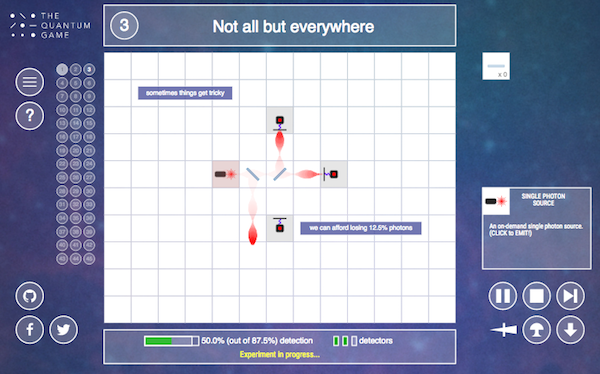
- A recent screenshot:
Development version
It's JavaScript, ES6. To build it you need Node.JS and jspm.io package manager.
It's open for collaboration - from level creation, through interface (re)design and adding additional effects (two-photon interference, interactions with an electron). Interested? Mail pmigdal@gmail.com.
Installing
After installing Node.js and jspm.io, and cloning this repository:
Then install local packages.
bash
npm install
jspm install
Additionally, for development we use eslint with eslint-plugin-lodash.
A note: jspm is seriously outdated and the build may not work.
Running server
Start local HTTP server in the quantum game directory (e.g. by http-server).
Does not need an install, as there are pre-built files.
Running tests
bash
./node_modules/.bin/karma startProduction version
Bundle it (and minify, if you want):
bash
jspm bundle-sfx --minify appIt creates a build.js file. To run it we need a modified index.html (it is a manually-modified file, stored in bundled/index.html).
On the server, the structure of files should look as follows:
bash
css\
favicon.ico
build.js
index.html
Docker
Alternatively, you can install dependencies using Docker.
Building
- You can build this image by running the following command in the root of this repository:
docker build . - You can also pass in a valid JSPM_GITHUB_AUTH_TOKEN by building like this:
docker build --build-arg JSPM_GITHUB_AUTH_TOKEN="a_jspm_encrypted_github_token" .- For more information see: https://stackoverflow.com/questions/30995040/jspm-saying-github-rate-limit-reached-how-to-fix
Running
- If your build completes sucessfully there will be a new image ID printed at the end of the build, which you can then use to to run it:
docker run -d -p 80:8080 ${IMAGE_ID_FROM_BUILD} - or for a community built image try this:
docker run -d -p 80:8080 spkane/quantum-game:latest
and then open up a web browser and point it to port 80 on your Docker host.